
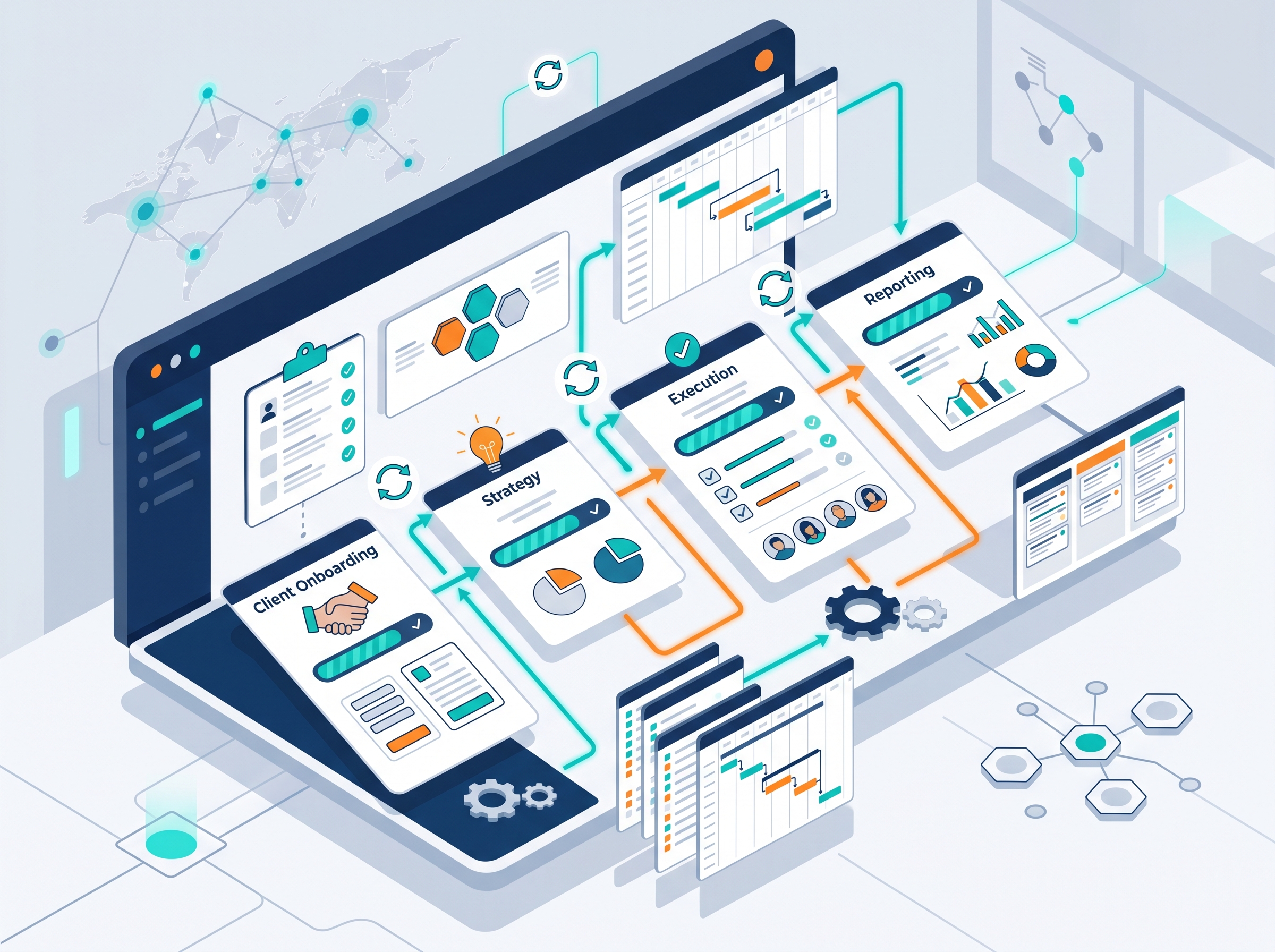
Innovation in digital agencies is driven by efficiency. A well-structured digital agency workflow automation strategy can significantly improve productivity and client outcomes. In today’s competitive landscape, agencies that embrace automation gain a clear advantage over those relying on manual processes. What Is a Digital Agency Workflow? A digital workflow defines how projects move from ideation to delivery. It includes: Client onboarding Strategy development Execution Reporting Each stage presents opportunities for automation. By streamlining these steps, agencies can reduce bottlenecks and deliver projects faster. Explore our web design & development services to build automation-ready systems for your agency. Why Workflow Automation Matters for Agencies Automation helps agencies: Save time on repetitive tasks Reduce manual errors Improve scalability A strong brand identity supports seamless automation adoption. When your processes run smoothly, your team can focus on high-value creative work instead of administrative tasks. Key Areas for Digital Agency Automation 1. Marketing Automation Using tools to automate campaigns and reporting. This includes email marketing, social media scheduling, and performance dashboards. 2. Project Management Tools Essential for startups and agencies handling multiple clients. These tools help track deadlines, assign tasks, and monitor progress in real time. 3. Sales Workflow Automation Automates lead nurturing and conversions. From initial contact to contract signing, automation ensures no opportunity falls through the cracks. Best Tools for Digital Agency Workflow Automation Effective digital agency workflow automation relies on modern tools such as: Project management tools for startups Freelance project management tools SEO traffic projection tools These solutions help agencies manage multiple clients efficiently while maintaining quality standards. Need intuitive interfaces for your automation tools? Check out our UI/UX design services. How to Build an Efficient Agency Workflow Follow these steps to successfully implement automation: Map your processes – Document every step from client intake to project delivery Identify automation opportunities – Find repetitive tasks that can be automated Implement tools – Choose solutions that fit your agency size and budget Train your team – Ensure everyone understands how to use the new systems Optimize continuously – Regularly review and improve your workflows Drive more traffic to your agency with our SEO & marketing services. Top Benefits of Workflow Automation Using workflow automation provides multiple advantages: Faster project delivery Better team collaboration Higher client satisfaction Increased revenue Reduced operational costs Agencies that automate consistently outperform those that don’t. The time saved can be reinvested into growth and innovation. Conclusion Investing in digital agency workflow automation is a smart move for any agency looking to stay competitive. From improving efficiency to enabling growth, automation plays a key role in digital transformation. Start automating today to build a more scalable and efficient agency.
Smart Systems Integration: Key to Digital Transformation
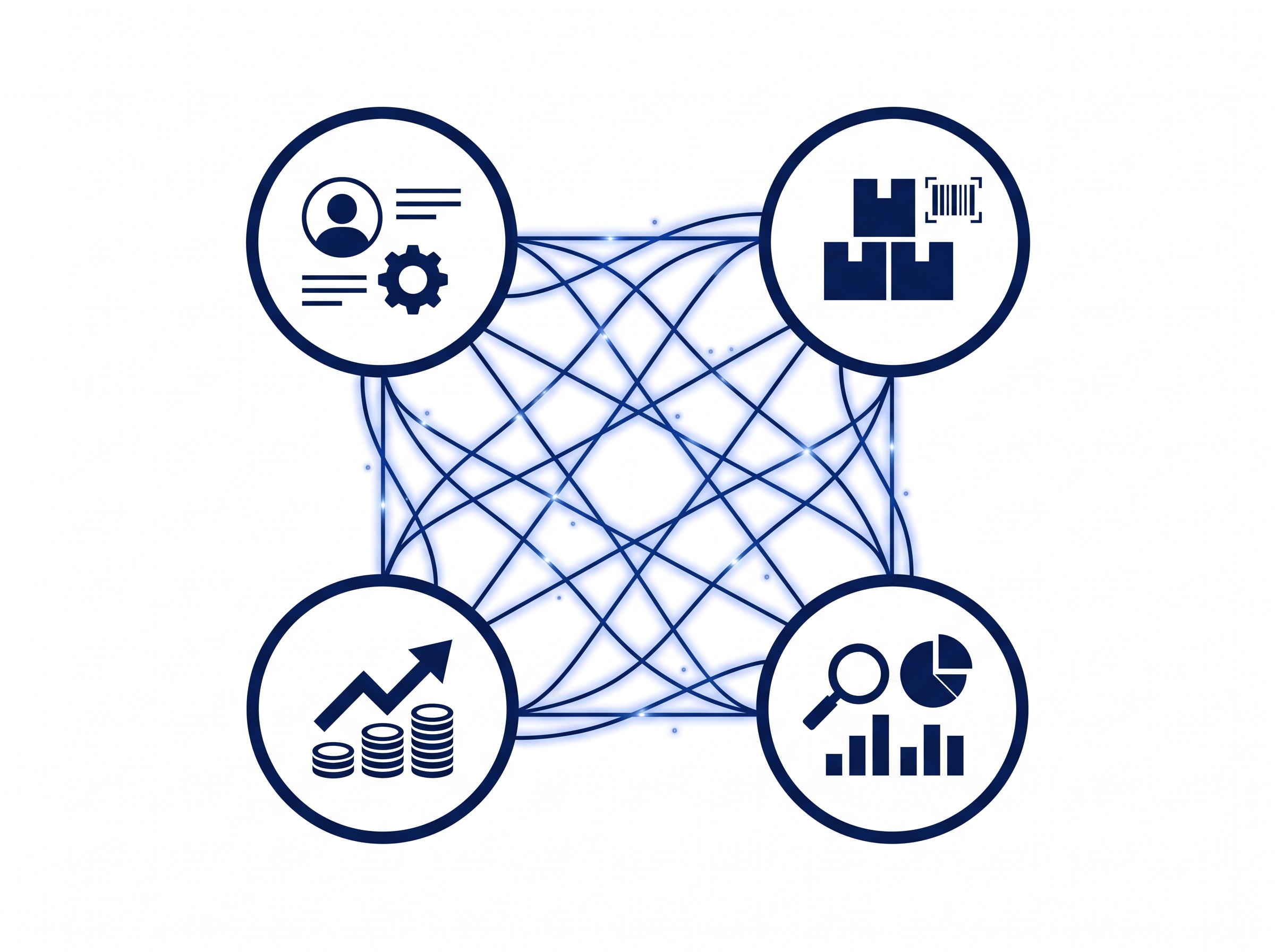
Modern businesses rely heavily on smart systems integration to stay competitive. Integrating digital systems ensures seamless communication between tools, teams, and processes. In today’s fast-paced market, connected systems are no longer optional — they are essential for survival and growth. What Is Smart Systems Integration? It involves connecting multiple digital tools and platforms into one unified ecosystem. Examples include: CRM + marketing automation integration Inventory + sales systems Data analytics + reporting tools Explore our web design & development services to build integration-ready systems for your business. Why Digital Systems Matter in 2026 Businesses today depend on: Digital intelligence systems for insights Adaptive digital systems for scalability Automated production systems for efficiency A strong brand identity supports seamless system integration and adoption. Key Components of Modern Business Systems 1. Data Integration Ensures all departments access consistent, real-time data across platforms. 2. Workflow Automation Automates repetitive tasks across departments, saving time and reducing errors. 3. System Monitoring Using business process monitors to track performance and identify bottlenecks. Best Tools for Smart Systems Integration Effective smart systems integration relies on modern tools that connect seamlessly. These solutions help businesses eliminate data silos and improve operational visibility. Need intuitive interfaces for your integrated systems? Check out our UI/UX design services. Benefits of Smart Systems Integration Using integrated systems provides multiple advantages: Improved decision-making Real-time data visibility Reduced operational silos Enhanced productivity Lower operational costs Use Case: Inventory System for Small Business A well-integrated inventory system for small business can: Track stock in real time Automate reordering Improve customer satisfaction Drive more traffic to your integrated systems with our SEO & marketing services. Conclusion Investing in a smart move for any business looking to stay competitive. Integration is not just a tech upgrade — it’s a business strategy that enables long-term growth. Start integrating today to build a more connected and efficient business.
Business Process Automation Services: Tools & Examples
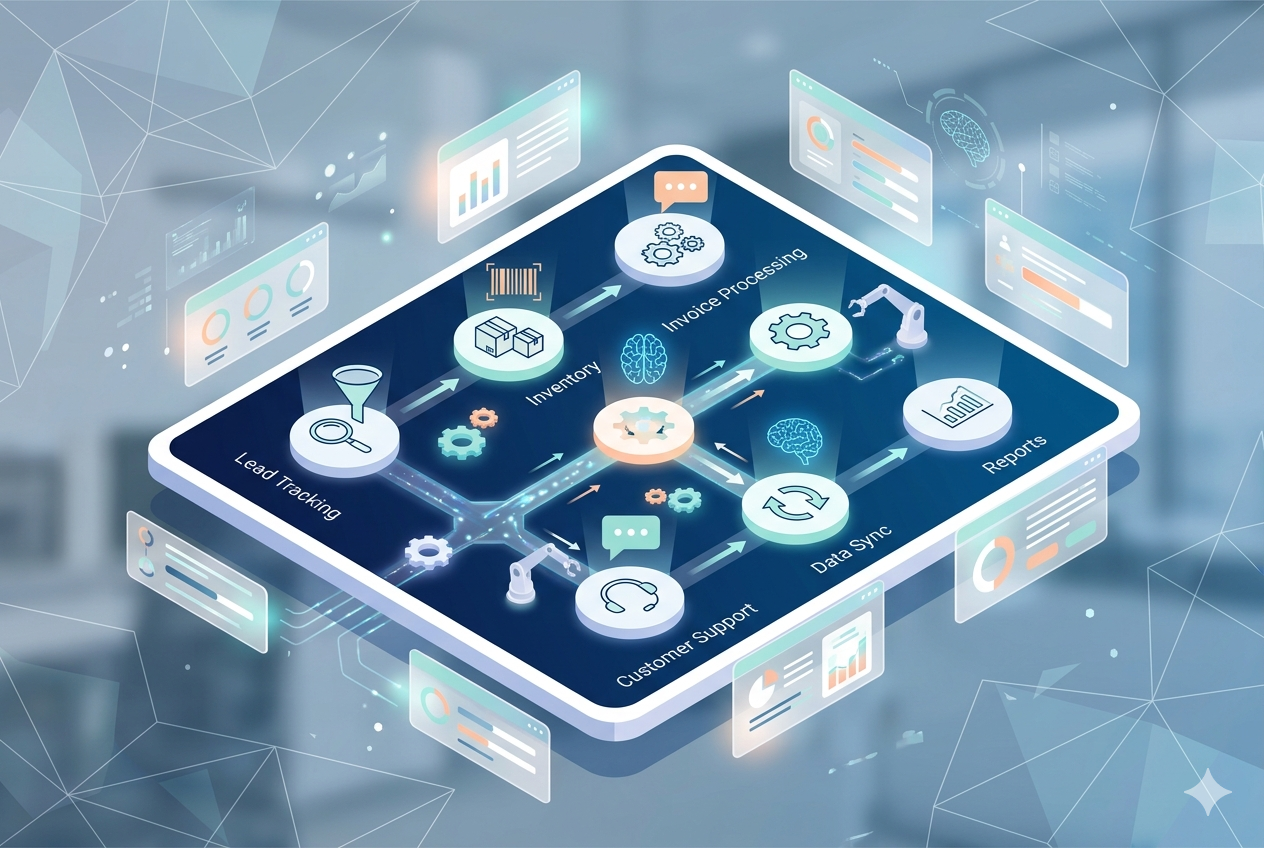
In today’s fast-paced digital world, business process automation services have become essential for companies aiming to improve efficiency and reduce operational costs. Businesses that adopt automation benefit from faster workflows, improved accuracy, and better scalability. If you are looking to implement automation solutions, this guide will help you understand key concepts, tools, and real-world examples. What Is Business Process Automation? Business process automation (BPA) uses technology to automate repetitive tasks and workflows with minimal human intervention. It helps businesses achieve: Higher operational efficiency Improved data accuracy Seamless scalability By using modern automation strategies, organizations can streamline operations and focus on strategic growth. Explore our web design & development services to build automation-ready websites. Practical Examples of Automation Here are some practical examples of workflow automation in action: 1. Sales Workflow Automation Automation tools streamline lead tracking, follow-ups, and CRM updates, helping businesses increase conversions. 2. Inventory Management Systems Automated systems monitor stock levels in real time, reducing the risk of overstocking or shortages. 3. Customer Support Automation Chatbots and automated ticketing systems improve response times and enhance customer experience. Best Tools for Business Process Automation Services Effective business process automation services rely on modern tools such as: CRM systems (e.g., Dynamics CRM tools) Workflow automation platforms AI-powered data automation tools These solutions help businesses improve productivity and operational efficiency. A strong brand identity supports seamless tool integration. How to Implement Automation Follow these steps to successfully adopt automation solutions: Identify repetitive tasks Analyze current workflows Select the right automation tools Implement and test processes Monitor and optimize continuously Need intuitive interfaces for your automated systems? Check out our UI/UX design services. Key Benefits of Automation Using workflow automation provides multiple advantages: Faster workflow execution Reduced manual errors Lower operational costs Better use of resources Automation allows businesses to scale efficiently while maintaining quality. Drive traffic to your automated operations with our SEO & marketing services. Conclusion Investing in business process automation services is a smart move for any business looking to stay competitive. From improving efficiency to enabling growth, automation plays a key role in digital transformation. Start automating today to build a more efficient and scalable business.
Which Web App Operating System Is Best in 2026? Guide
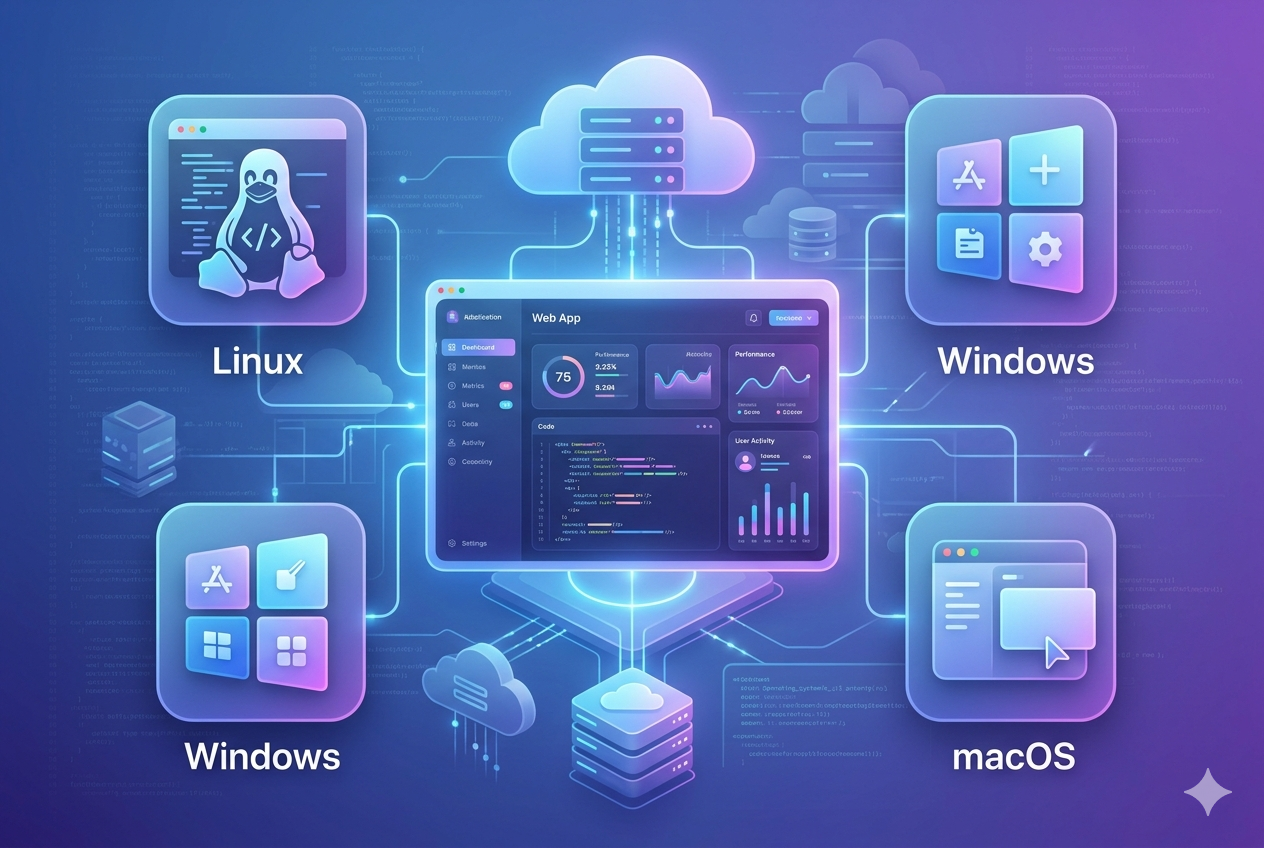
Choosing the right web app operating system can significantly improve performance, scalability, and stability of applications. Developers, startups, and freelancers all benefit from selecting the right system in 2026. 💻 What Is a Web App Operating System (Web App Operating System)? A web app operating system is a platform that supports building, running, and hosting web applications with strong performance, security, and compatibility. A good system ensures smooth deployment and scalability. 🏆 Best Web App Operating Systems in 2026 (Web App Operating System Guide) 1. Linux as a Web App Operating System (Top Choice) Linux is the most widely used option for servers and development. Why Linux is best: Open-source and flexible High performance for hosting Strong security features Full compatibility with modern frameworks 👉 Popular distributions: Ubuntu Debian CentOS 2. Windows for Enterprise Development (Web App Operating System for Enterprise) Windows is a powerful and reliable choice for enterprise environments and Microsoft-based systems, offering strong integration with business applications, seamless support for .NET development, and advanced tools for managing large-scale organizational workflows efficiently. Benefits: Easy-to-use interface Strong .NET ecosystem support Ideal for enterprise applications 3. macOS for Developers (Web App Operating System for Developers) macOS is a balanced option for developers. Why macOS works well: Unix-based architecture Smooth development workflow Great UI/UX for productivity ⚙️ Best Use Cases for Web App Operating System 🔹 Development (Web App Operating System Use) 👉 Linux or macOS 🔹 Hosting (Web App Operating System Hosting) 👉 Linux (highest performance) 🔹 Enterprise Solutions (Web App Operating System Enterprise) 👉 Windows Server 🚀 Choosing the Right Web App Operating System When selecting a web app operating system, consider: 1. Tech Stack Compatibility Ensure support for Node.js, Python, PHP, etc. 2. Performance Needs Linux is lightweight and stable. 3. Budget Linux = free Windows/macOS = paid 4. Ease of Use Windows and macOS are beginner-friendly. 🧠 Pro Tip: Modern Development Approach Instead of relying only on one system, developers use tools like: Docker Kubernetes These allow apps to run consistently across any platform. 📊 Final Verdict The best choice in 2026 is Linux. However: Windows is best for Microsoft-based systems macOS is best for developer experience 🔗 Helpful Resources https://designzeros.com/web-design-development/ https://designzeros.com/design-branding/ https://designzeros.com/ui-ux-design/ https://designzeros.com/seo-marketing/
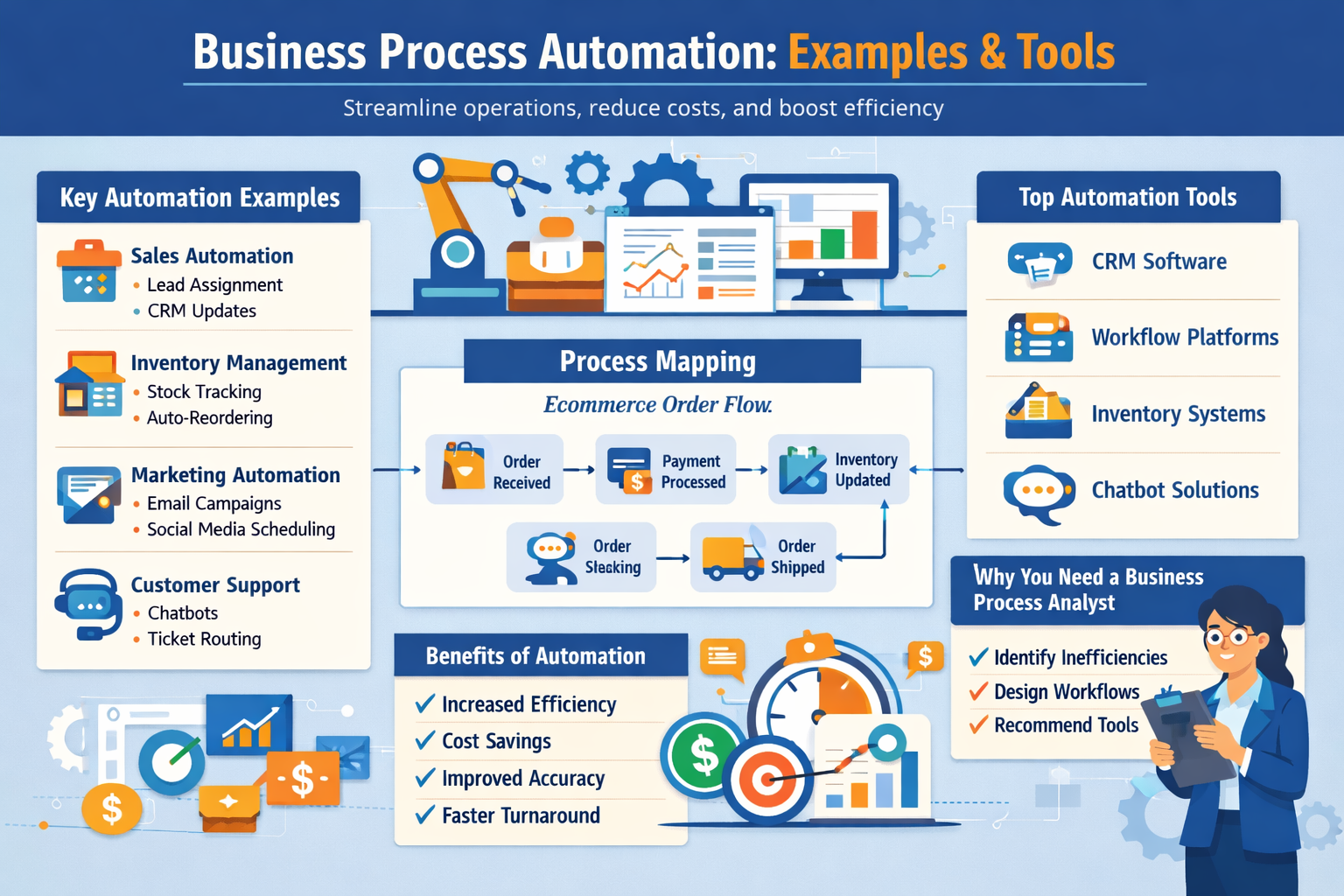
Business Process Automation: Examples & Tools
In today’s fast-moving digital world, businesses that rely on manual processes fall behind quickly. That’s why business process automation (BPA) has become essential for improving efficiency, reducing costs, and scaling operations. In this guide, we’ll explore what business process automation is, real-world examples, and how to implement it effectively. What Is Business Process Automation? Business process automation is the use of technology to automate repetitive tasks and workflows within an organization. Instead of handling tasks manually, businesses use software tools and systems to streamline operations. What Is Business Process Operations? Business process operations refer to the day-to-day execution of structured workflows within a company. These include: Sales processes Customer onboarding Inventory management Marketing campaigns Financial reporting Automation improves these operations by reducing human error and saving time. Business Process Automation Examples Here are some practical business process automation examples: 1. Sales Workflow Automation Automatically assign leads Send follow-up emails Update CRM systems 2. Inventory Management Systems Track stock levels in real-time Auto-reorder products Generate reports 3. Marketing Automation Email campaigns Lead nurturing sequences Social media scheduling 4. Customer Support Automation Chatbots Ticket routing Auto-responses Business Process Mapping Examples Before automating anything, you need to map your processes. Example: Ecommerce Order Process Customer places order Payment is processed Inventory is updated Order is shipped Customer receives confirmation Mapping helps identify inefficiencies before automation. Tools to Automate Sales Workflow Choosing the right tools is key. Popular data automation tools: CRM platforms Workflow automation software Project management tools Integration platforms Features to look for: Easy integrations Custom workflows Analytics and reporting Scalability Business Process Analyst: Why You Need One A business process analyst helps organizations: Identify inefficiencies Design optimized workflows Recommend automation tools Improve operational efficiency They play a critical role in successful automation projects. Ecommerce Website Development Process Automation also plays a key role in ecommerce website development. Steps include: Planning and strategy UI/UX design Development Testing Deployment Automation integration (payments, emails, inventory) Digital Marketing Agency Workflow A streamlined digital agency workflow often includes: Client onboarding automation Campaign setup templates Reporting dashboards Task automation This reduces manual work and improves client satisfaction. How to Define Business Processes to Automate Not every process should be automated. Focus on: Repetitive tasks Time-consuming workflows Error-prone activities High-volume operations Benefits of Business Process Automation Increased efficiency Reduced operational costs Improved accuracy Faster turnaround times Better scalability Final Thoughts Businesses that invest in automation and systems gain a competitive edge. Whether you’re a startup or an established company, optimizing your workflows can dramatically improve performance. Start small, automate key processes, and scale from there.
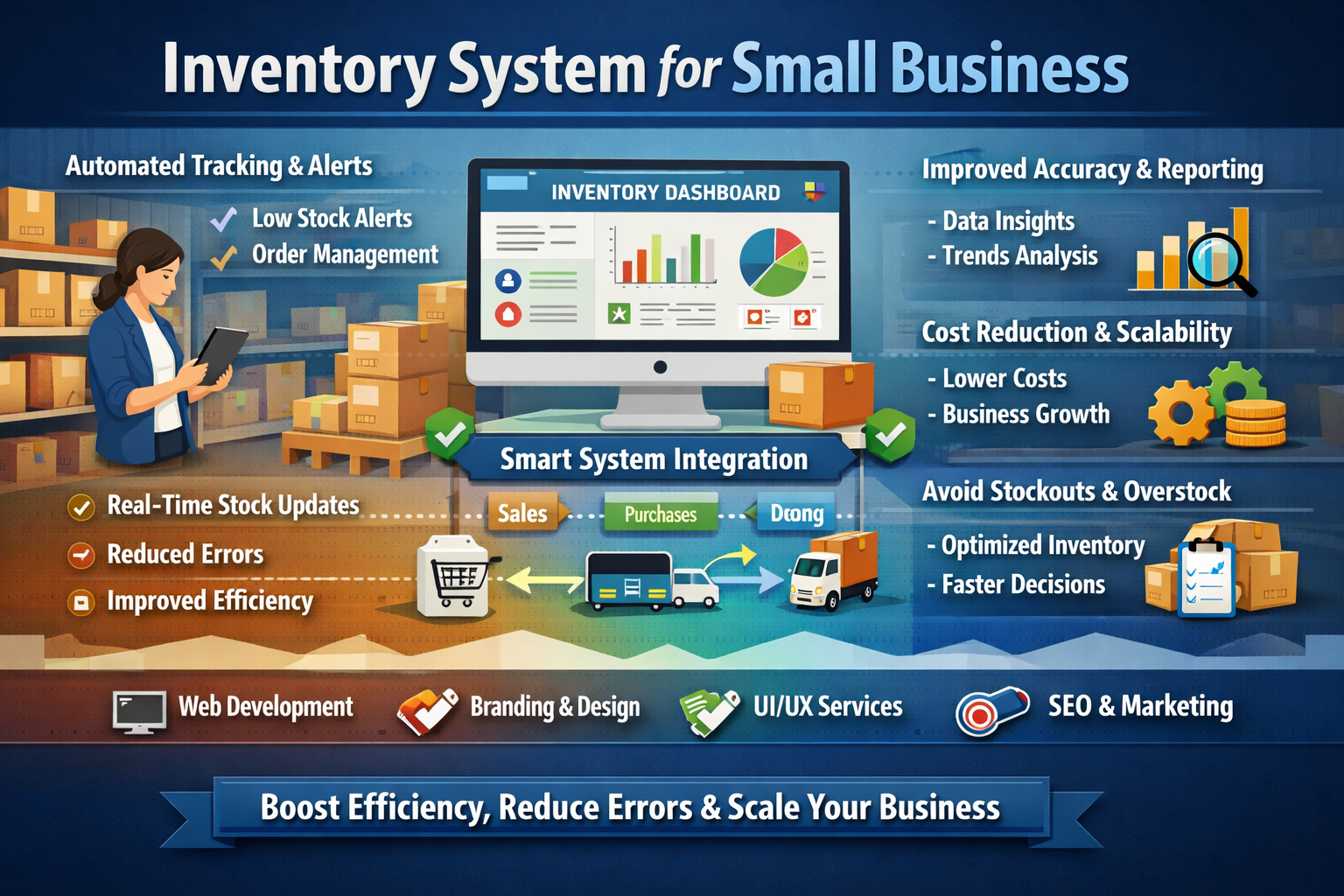
inventory system for small business guide
An inventory system for small business helps manage stock efficiently, reduce errors, and improve overall operational performance. It is a key part of modern business systems that support growth, accuracy, and scalability. With proper automation, businesses can track inventory in real time and avoid stock issues. inventory system for small business in automation and workflow systems A structured inventory system for small business in automation and workflow systems helps track stock levels, manage orders, and reduce manual errors. It ensures smooth operations and improves visibility across all inventory activities. importance of business systems in inventory management processes Business systems play a critical role in managing inventory efficiently. They ensure that stock data is updated in real time, organized properly, and easily accessible for decision-making. This improves accuracy and reduces operational mistakes. smart systems integration for inventory automation workflows Smart systems integration connects different tools and platforms into one unified inventory workflow. It allows businesses to sync sales, purchases, and stock data automatically, improving efficiency and reducing manual effort. tooling and automation in inventory control systems Automation tools help track stock levels, send alerts for low inventory, and reduce repetitive manual tasks. These systems improve accuracy, save time, and allow businesses to focus on growth instead of manual tracking. benefits of inventory automation for small business systems Inventory automation improves accuracy, reduces costs, and supports business scalability. It helps prevent stock shortages and overstocking while ensuring smooth daily operations. Businesses can also make faster and more informed decisions. Additionally, automated systems improve reporting, allowing owners to analyze stock trends and optimize purchasing strategies more effectively. related agency services for automation systems Web Development Services: https://designzeros.com/web-design-development/ Branding & Design Services: https://designzeros.com/design-branding/ UI/UX Design Services: https://designzeros.com/ui-ux-design/ SEO & Marketing Services: https://designzeros.com/seo-marketing/ conclusion An inventory system for small business helps improve efficiency, reduce errors, and ensure smooth operations. With automation and smart systems integration, businesses can scale faster and manage inventory more effectively.

Why Your Dubai Business Needs a World-Class UI/UX Designer (And How We Deliver)
Dubai is one of the fastest-growing digital economies in the world. From fintech startups in DIFC to e-commerce giants on Sheikh Zayed Road, every ambitious business in the UAE is racing to build products that don’t just work — they wow. And at the center of every great digital product is a skilled UI/UX designer. But finding the right UI/UX designer in Dubai — someone who understands your users, your market, and your business goals — is easier said than done. That’s where we come in. What Does a UI/UX Designer Actually Do? Before we talk about why your Dubai business needs one, let’s quickly clarify the role. UI (User Interface) design is about the visual layer — the buttons, colors, typography, icons, and layouts that users see and interact with on screen. UX (User Experience) design goes deeper. It’s the strategic discipline of understanding how users think, what they need, and how to design a journey that feels intuitive, efficient, and satisfying — from the first click to the final conversion. Together, UI/UX design is the difference between an app that users love and one they abandon after 30 seconds. The Dubai Digital Market: Why Design Standards Are Higher Than Ever Dubai’s digital landscape is uniquely demanding. Your users are cosmopolitan, tech-savvy, and accustomed to world-class digital experiences. They compare your app to the best in the world — not just in the region. Consider this: the UAE boasts one of the highest smartphone penetration rates globally, and Dubai’s residents expect seamless, fast, beautifully designed digital products. A clunky interface doesn’t just frustrate users — it signals that your brand isn’t serious. Whether you’re building a real estate platform, a healthcare portal, a logistics app, or an enterprise SaaS product, the expectations are high. Your design needs to match. What Sets Our UI/UX Designers Apart in Dubai We’re not a generic design shop. We’re a software agency that specializes in building digital products for businesses operating in — and scaling beyond — the UAE. Here’s what makes our approach different: 1. We Design for Diverse, Multilingual Audiences Dubai’s population is incredibly diverse. Your product likely needs to work beautifully in both English and Arabic — including right-to-left (RTL) layouts, culturally appropriate visual choices, and accessibility across demographics. Our designers are experienced in building bilingual, RTL-compatible interfaces that feel native in both directions. 2. We’re Business-Outcome Focused We don’t design for aesthetics alone. Every design decision we make is tied to a business goal — whether that’s improving onboarding completion rates, reducing support tickets, increasing conversion on a checkout flow, or boosting user retention. We measure success in outcomes, not Dribbble likes. 3. We Integrate Seamlessly With Development One of the biggest pain points businesses face is the handoff between designers and developers. At our agency, design and engineering work together from day one. Our designers produce pixel-perfect, developer-ready Figma files with proper component libraries, design tokens, and documented specs — eliminating costly rework. 4. We Understand the Dubai Market We’ve worked with businesses across Dubai’s key industries — real estate, retail, logistics, fintech, and hospitality. We understand local user behavior, regional compliance considerations, and the design patterns that resonate with UAE audiences. Our UI/UX Design Process Great design doesn’t happen by accident. Here’s how we approach every project: Discovery & Research — We start by understanding your users, your competitors, and your business objectives. This includes user interviews, competitive analysis, and defining key user personas. Information Architecture — Before we draw a single screen, we map out the full user journey, define site/app structure, and identify potential friction points. Wireframing & Prototyping — We build low-fidelity wireframes to validate structure and flow, then move to interactive prototypes for user testing — before a single line of code is written. Visual Design — We craft a visual language that aligns with your brand, speaks to your audience, and stands out in a competitive market. Every element has a purpose. Handoff & Support — We deliver a complete design system your dev team can build from, and we stay involved during development to ensure pixel-perfect implementation. The Real Cost of Bad UX in Dubai A poor user experience doesn’t just look unprofessional — it costs you money. Research consistently shows that every $1 invested in UX returns between $2 and $100 in value through improved conversion, reduced development rework, and lower customer support costs. In Dubai’s competitive market, users won’t give you a second chance. If your onboarding is confusing, your checkout is clunky, or your mobile experience is broken — they’ll move on to a competitor in seconds. Investing in a skilled UI/UX designer isn’t a luxury. It’s one of the highest-ROI decisions you can make for your digital product. Ready to Build Something Exceptional? If you’re looking for a UI/UX designer in Dubai who combines strategic thinking, technical fluency, and world-class visual craft — let’s talk. We work with startups, scale-ups, and enterprises across the UAE and beyond. Whether you need a full product design engagement or a design audit of your existing platform, our team is ready to help. [Get in touch with our team →]
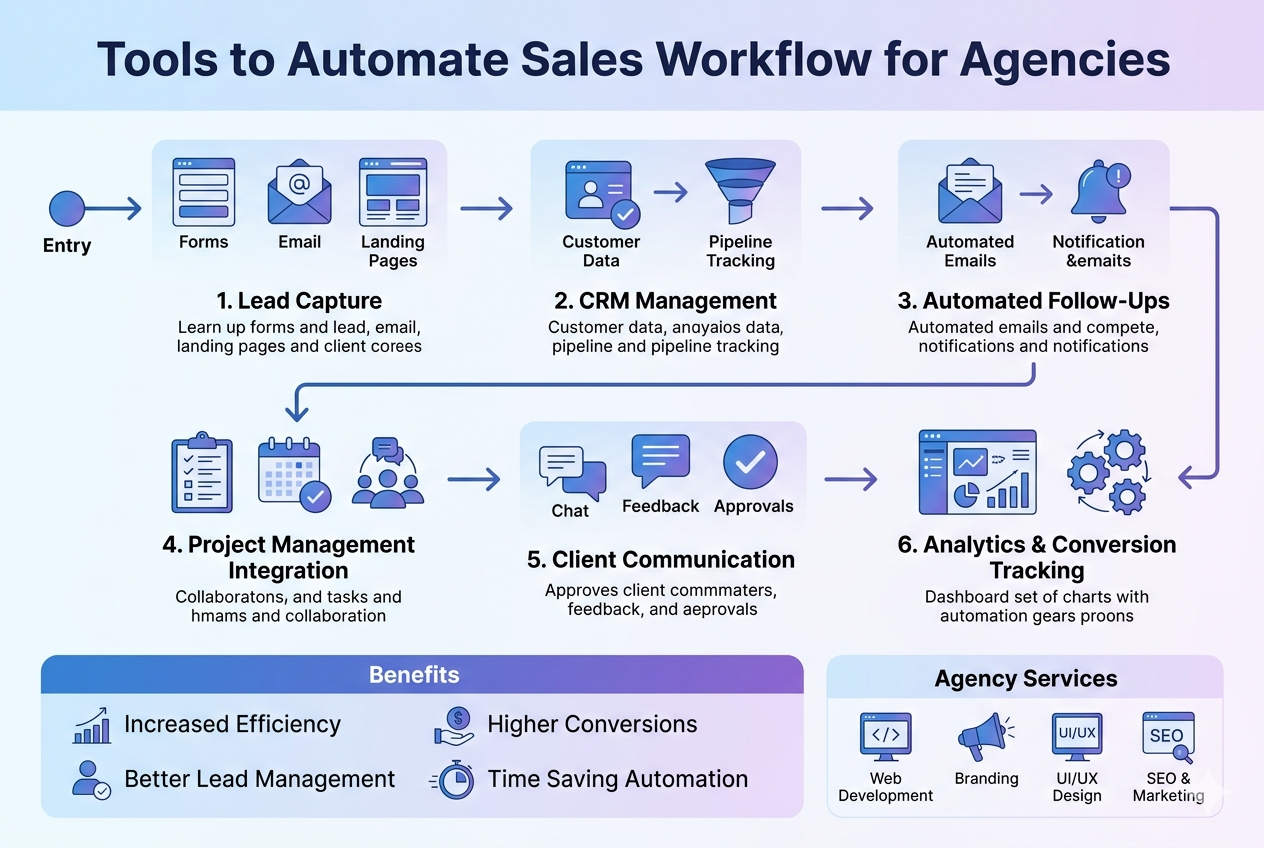
tools to automate sales workflow for agencies
Tools to automate sales workflow help agencies improve efficiency, increase conversions, and manage clients more effectively. By using automation systems, agencies can reduce manual work, speed up processes, and ensure consistent follow-ups with leads. tools to automate sales workflow in agency automation systems Using tools to automate sales workflow in agency automation systems helps streamline the entire sales process. It ensures that leads are captured, organized, and followed up automatically, improving conversion rates and reducing missed opportunities. importance of sales workflow automation in digital agencies Sales workflow automation is important for modern agencies because it ensures that every lead is properly managed. Automated systems handle repetitive tasks such as follow-ups, lead tracking, and data entry, allowing teams to focus on closing deals and building client relationships. CRM tools and sales workflow automation systems CRM tools like Dynamics CRM help agencies manage customer data, track interactions, and automate communication. These systems improve client relationship management and provide clear visibility of the entire sales pipeline. project management tools for sales workflow automation Project management tools for startups and agencies help organize tasks, track progress, and improve collaboration. When integrated with sales systems, they create a smooth workflow from lead generation to project delivery. automation tools for freelancers and small company agencies Freelance project management tools are ideal for small agencies and freelancers. They provide lightweight automation solutions for managing clients, tasks, and communication without complex setups. related agency services for automation systems To implement complete sales automation systems, agencies often use professional services such as: Web Development Services: https://designzeros.com/web-design-development/ Branding & Design Services: https://designzeros.com/design-branding/ UI/UX Design Services: https://designzeros.com/ui-ux-design/ SEO & Marketing Services: https://designzeros.com/seo-marketing/ conclusion Tools to automate sales workflow help agencies improve efficiency, manage clients better, and increase conversions. Automation systems allow businesses to scale faster and operate more effectively with less manual effort.
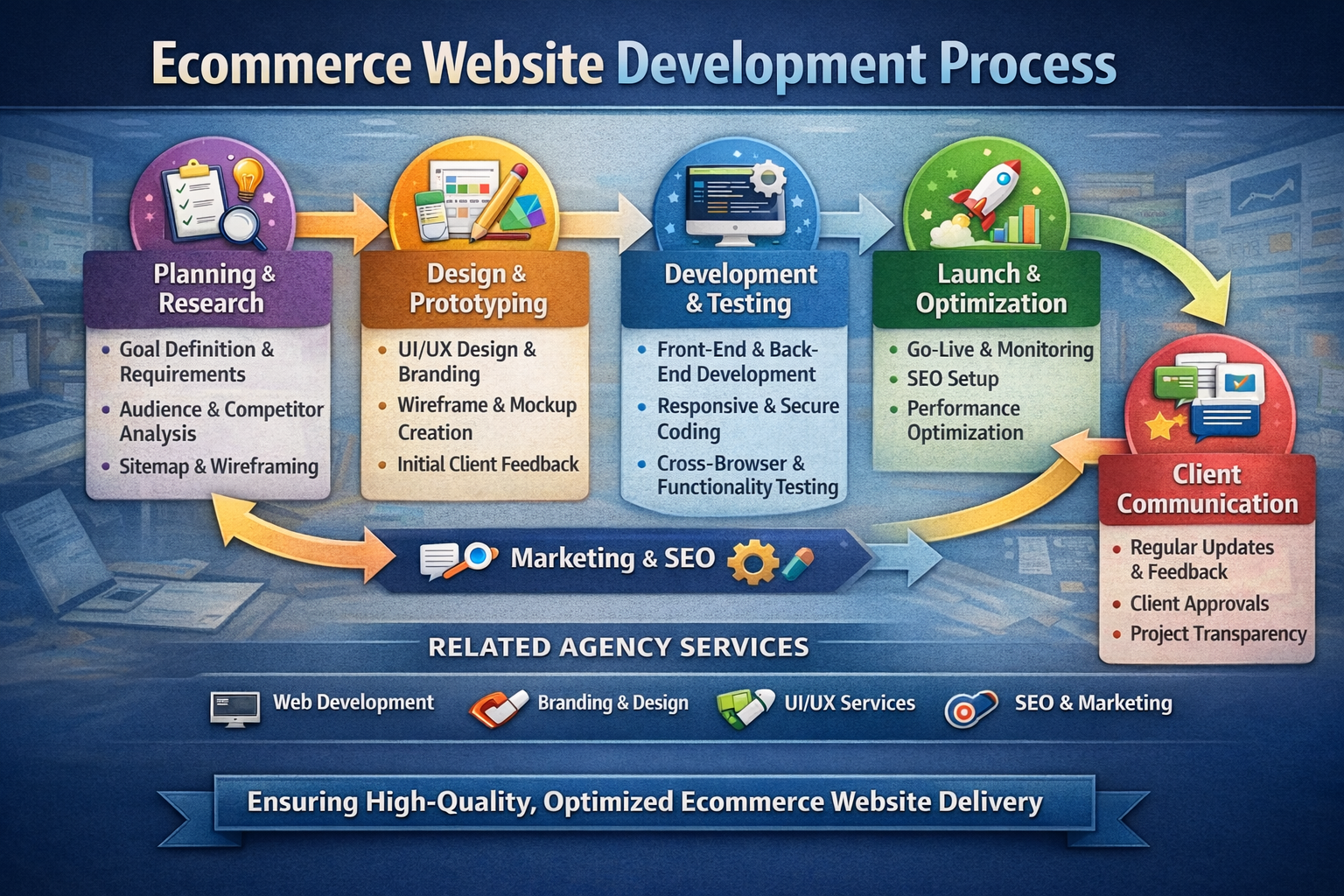
ecommerce website development process guide
The ecommerce website development process helps agencies deliver structured, high-quality websites that are optimized for performance, user experience, and conversions. A clear development system improves efficiency, reduces errors, and ensures successful project delivery for clients. ecommerce website development process workflow in digital agencies A structured ecommerce website development process workflow in digital agencies ensures that every stage is executed in an organized and efficient way. It helps teams manage projects smoothly, avoid delays, and maintain clear communication during production. ecommerce website development process planning and research systems This stage includes understanding client goals, target audience, business requirements, and product structure. Proper planning ensures the online store development process is built on a strong foundation aligned with business objectives. ecommerce website development process in digital agency workflow systems A structured digital agency workflow system ensures smooth execution of each project phase. It helps teams coordinate tasks, track progress, and maintain consistency from planning to final delivery. ecommerce website development process design and development stages Design focuses on user experience, visual layout, and brand identity, while development ensures functionality, speed, and technical performance. Together, they create a seamless and high-performing ecommerce platform. marketing and optimization workflow systems for ecommerce websites A strong marketing and optimization workflow ensures the website is ready for traffic, SEO, and conversions. It integrates search optimization strategies, content structure, and performance improvements into the development process. client management systems in ecommerce projects Client systems help manage communication, approvals, feedback, and project updates efficiently. These systems improve transparency and ensure smooth collaboration between agencies and clients. Proper communication workflows also reduce delays and improve project accuracy. related agency services Web Development Services: https://designzeros.com/web-design-development/ Branding & Design Services: https://designzeros.com/design-branding/ UI/UX Design Services: https://designzeros.com/ui-ux-design/ SEO & Marketing Services: https://designzeros.com/seo-marketing/ conclusion The ecommerce website development process ensures better performance, smoother workflows, and successful project delivery. Agencies that follow structured systems can scale faster and deliver more efficient digital solutions.

Business Process Automation Examples for Modern Agencies
Business process automation examples help agencies reduce manual work and improve efficiency Business process automation examples help agencies reduce manual work, improve efficiency, and scale faster. These automation systems allow digital agencies to streamline operations, remove repetitive tasks, and focus more on growth, client management, and strategy execution. Business process automation examples in modern workflow systems Automation examples in modern workflow systems show how agencies can improve productivity using structured business processes. These systems help teams stay organized, reduce errors, and maintain consistency across all operations. What Are Business Systems and automation workflows? Business systems are structured processes that manage daily operations in a consistent and efficient way. These systems are essential for digital agencies to handle tasks such as client onboarding, project management, communication, and reporting. When combined with automation workflows, they help agencies scale without increasing manual workload. Common process automation examples in agencies Client onboarding automation systems Agencies can automate onboarding by collecting client data, sending welcome emails, and assigning internal tasks automatically. This improves speed and enhances client experience. Lead management automation workflows Leads can be captured, organized, and followed up automatically using structured systems. This ensures better conversion rates and no missed opportunities. Reporting and analytics automation Automation tools generate performance reports without manual effort, helping agencies make faster and more accurate decisions. Task and project workflow automation Tasks, deadlines, and project tracking can be automated to improve team coordination and delivery speed. Benefits of business process automation systems Automation reduces workload, improves efficiency, and strengthens client management. It also helps agencies scale operations without increasing costs, making growth more sustainable and predictable. Related agency services To implement strong automation and systems, agencies often combine it with professional services such as: Web Development Services: https://designzeros.com/web-design-development/ Branding & Design Services: https://designzeros.com/design-branding/ UI/UX Design Services: https://designzeros.com/ui-ux-design/ SEO & Marketing Services: https://designzeros.com/seo-marketing/ Conclusion Business process automation examples clearly show how agencies can build structured systems, improve workflow efficiency, and scale faster using modern automation tools. Agencies that implement these systems gain stronger performance, better client management, and long-term growth advantages.